Workflow · UGC
Make AI UGC hooks without being on camera
A face you generated. A hook that stops the scroll.
This workflow gets you real-looking UGC videos without ever being on camera. UGC is the format that converts. A real-looking person, talking to camera, vouching for a thing — it outperforms polished ads because it doesn't look like one. The catch has always been the shoot: you need a face, a phone, decent light, and the willingness to be on camera over and over. Most people stall right there.
This creator doesn't shoot anything. The face in every hook is generated. The workflow is short. Pull a framing reference off Pinterest. Animate a single still into a natural-motion talking-head clip with Gemini Omni in Google AI Studio. Then stitch that clip in front of a real product demo in Post Ripple — caption, music, done. No camera ever comes out.
Below is the hands-on playbook, step by step, exactly how it's done. At the end is how the same creator handed the whole loop to an agent, because every step here is stable enough to write down once and reuse.
The output
A video like this, and nobody filmed anything.
This face was generated from a single still. In the finished post it delivers a one-line hook, then cuts straight to a real product demo over a trending track. Nobody was ever on camera.
The generated hook, from one still. In Post Ripple it gets stitched in front of your product demo, with a caption and a track.
The stack
Three tools, one job each
Nothing exotic, and no video editor. Pinterest hands you the look, Gemini Omni generates the face, and Post Ripple assembles the format and ships it. You're the only operator.
The reference
Where the shot comes from — not the face, the framing. You save the poses, angles, and lighting that read as real UGC, and that becomes the brief for what to generate.
The face
Gemini Omni · Google AI Studio
Google's multimodal model turns a single still and a prompt into a short, natural-motion talking-head clip. No shoot, no actor, no being on camera. This clip is your hook.
Assemble + ship
Post Ripple
Stitches the generated hook in front of your product demo, drops on background music, burns in the caption, renders it, and pushes it to your TikTok drafts to post yourself.
Step one
Steal the framing, not the face
Open Pinterest and build a small board, but pay attention to the wrong thing on purpose. You're not collecting people. You're collecting shots: the arm's-length selfie angle, the head-and-shoulders talking-to-camera frame, the slightly-off, real-room lighting. That's the vocabulary of UGC. You then lock that framing into a still of your own subject. Here are the three I used.
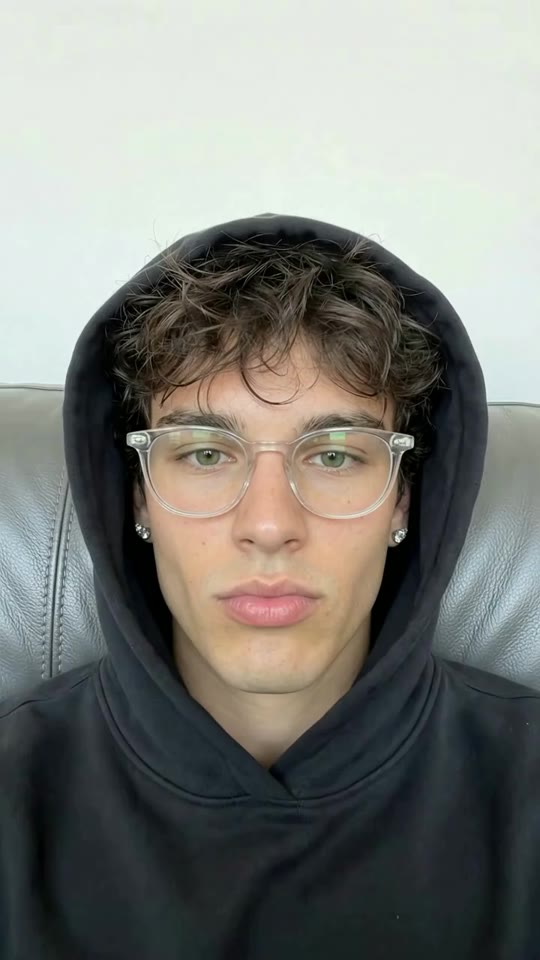
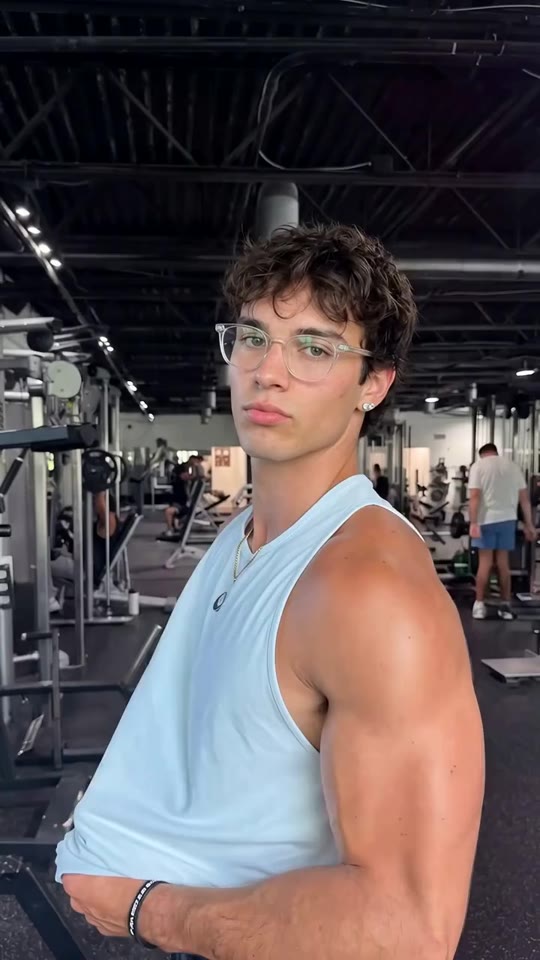

Because the Pinterest reference only informs pose, angle, and lighting — never identity — the subject in these stills is your own. You sidestep the likeness and rights problems that come with animating a stranger's photo, and you get a subject you can reuse forever. Next, they move.
Step two
Animate one still into a talking head
In Google AI Studio, hand Gemini Omni a single still of your subject and a prompt. The entire craft is asking for less. Cinematic camera moves are the giveaway that a clip is AI. Real phone video barely moves, so you prompt for blinks, a small head tilt, one hand gesture — and a locked frame. The boring motion is what makes it read as a real person.
Five seconds, vertical. That clip is your hook. Below are three real ones, each grown from a single still.
Each clip starts on its still, then Gemini Omni brings it to life — the motion stays small enough to pass as a real phone video.
Animate this still into a 5-second vertical UGC clip.

Motion: subtle and real, like a handheld phone selfie.
  - natural blinks, small head movement, a relaxed smile
  - one easy hand gesture near the end
  - keep the framing locked — NO cinematic camera moves
Lighting: soft, indoor, slightly uneven, like a real room.
Read: casual, talking to a friend. Not polished. Not an ad.
Step three
Stitch the hook to the demo
This is where Post Ripple does the assembly. The hook + demo builder takes your generated clip as the hook, plays your real product demo right after it, burns in an outlined caption, and mixes a background track underneath — all in one render. No timeline, no editor, no exporting between apps.
Instead of auto-publishing, the finished video drops into your TikTok app inbox as a draft. Automated posting through any API can quietly cap your reach, so you open the app and tap post yourself. The upload reads as native, and everything up to that tap was handled for you.
Peek under the hood
// Stitch the generated hook in front of your demo, with a caption + music.
create_video({
  type: "hook_demo",
  hookId: "hook_omni_clip",        // your Gemini Omni clip, saved as a hook
  demoVideoId: "vid_product_demo", // your real product footage
  musicId: "trk_trending_upbeat",  // from list_music
  caption: "i genuinely can't tell this is AI",
  captionPosition: "top",
  captionStyle: { treatment: "outline", font: "impact", fontScale: 0.9 }
})
// → returns { creationId }. Poll get_creation until "completed",
//   then schedule_post(resultVideoId) to your TikTok drafts.
The hook + demo builder: hook, demo, caption, and music in one render.
The taste layer
Four rules that keep AI UGC from looking AI.
The tools do the labor, but the difference between a clip that converts and one that reads as fake is a handful of rules, learned from the clips that actually performed.
Subtle motion beats cinematic
The tell of AI video is a sweeping camera move. Real UGC barely moves. Prompt for blinks, a small head tilt, one easy hand gesture — and lock the framing. Boring motion is what sells it.
The hook is a promise
The first 1–2 seconds of face exist to make one promise. The demo is the payoff. If the hook doesn't set up exactly what the demo delivers, the cut feels like two different videos.
Cut to value fast
A second or two of the generated face, then straight into the demo. Lingering on the talking head is where watch time leaks. The person is the hook, not the content.
Match the audio to the energy
The track sets the read before a word lands. Upbeat and trending for a fun product, calm and warm for a considered one. The wrong song makes even a good hook feel off.
Make it repeatable
Then I stopped doing it myself.
Once the three steps were dialed in, none of them actually needed me. The reference is a rule, the Omni prompt is a template, and the Post Ripple render is a single call. So I wrote the loop down as a brief and handed it to an agent — and it basically took over.
The agent generates the hook with Gemini Omni through the Google AI Studio API. Then it drives Post Ripple's MCP server — the way AI assistants connect to apps — to render the hook + demo and drop each finished video into my TikTok drafts. Every render is tagged, so a retry never becomes a double-post. I still pick the ideas and tap post. The brief on the right is the actual shape of it.
Make this week's UGC hooks.

1. For each hook idea, pick a framing reference from my
   Pinterest board — pose, angle, lighting, NOT the face.
2. Generate the talking-head clip in Google AI Studio with
   Gemini Omni. Prompt for subtle, real motion, no cinematic
   camera moves. 5s vertical. Save it to my hooks.
3. In Post Ripple: create_video type "hook_demo" with the Omni
   clip as the hook, my product demo, and a trending track.
   Outlined caption up top.
4. Poll get_creation, then schedule_post to TikTok, Reels, and
   Shorts with postMode: inbox. I'll tap post.

Rules: 1–2s of face then cut to value, the hook is a promise
the demo pays off, subtle motion beats cinematic every time.
Common questions
AI UGC, without the shoot
How do I make AI UGC videos without being on camera?
Start with a framing reference — a Pinterest pose or angle you like. Animate a single still into a short talking-head clip with Gemini Omni in Google AI Studio. Then stitch that clip in front of your product demo with music and a caption in Post Ripple. You never film yourself — the face is generated and the demo is your real product.
What is Gemini Omni?
Gemini Omni is Google's multimodal generation model, announced at Google I/O 2026. It takes text, images, audio, and video as input and produces video — including turning a single still image into a short, natural-motion clip. The developer-facing version, Gemini Omni Flash, is available through Google AI Studio and the Gemini API.
Is it legal to use a photo from Pinterest to generate a video?
That's exactly why this workflow only uses Pinterest as a framing reference — the pose, the camera angle, the lighting. The face itself is new and AI-made, never a real person's photo. You're studying the shot, not copying a person. Make your own subject and the rights problems go away entirely.
What is a hook + demo video?
It's the short-form format that sells best. A UGC hook is a person reacting or talking to camera. You stitch it in front of a product demo, usually with music. The hook earns the view; the demo turns it into a click. Post Ripple builds the whole thing in one render — hook clip, demo, caption, and music.
Can an AI agent run this whole workflow?
Yes. Once the steps are stable you can hand them to an agent. It generates the hook with Gemini Omni via the Google AI Studio API. Then it drives Post Ripple's MCP server to assemble the hook + demo, add music, render, and drop the result into your TikTok drafts. You keep the taste and tap post; the agent does the labor.
Does auto-publishing these hurt my reach?
Fully automated posting through any API can quietly cap reach, so this workflow avoids it. The finished video lands in your TikTok app inbox as a draft. You open the app and post it by hand, which keeps the upload looking native while everything up to that last tap is done for you.
Do I need to know how to code?
No. The hands-on version is all done in Google AI Studio and the Post Ripple studio by hand. The code samples on this page only show what an agent runs behind the scenes if you choose to automate it.